App Features
Your TDEE in easyChef Pro: From Number to Meal Plan
The numbers in the film are sample values (a TDEE of about 2,642 kcal a day and a daily target of 2,642), and the food footage is illustration.
Transcript
Total Daily Energy Expenditure, your TDEE.
It's a great number to know, but on its own, it won't plan breakfast, lunch, or dinner.
easyChef Pro puts your TDEE and your macros front and center in your Health Summary,
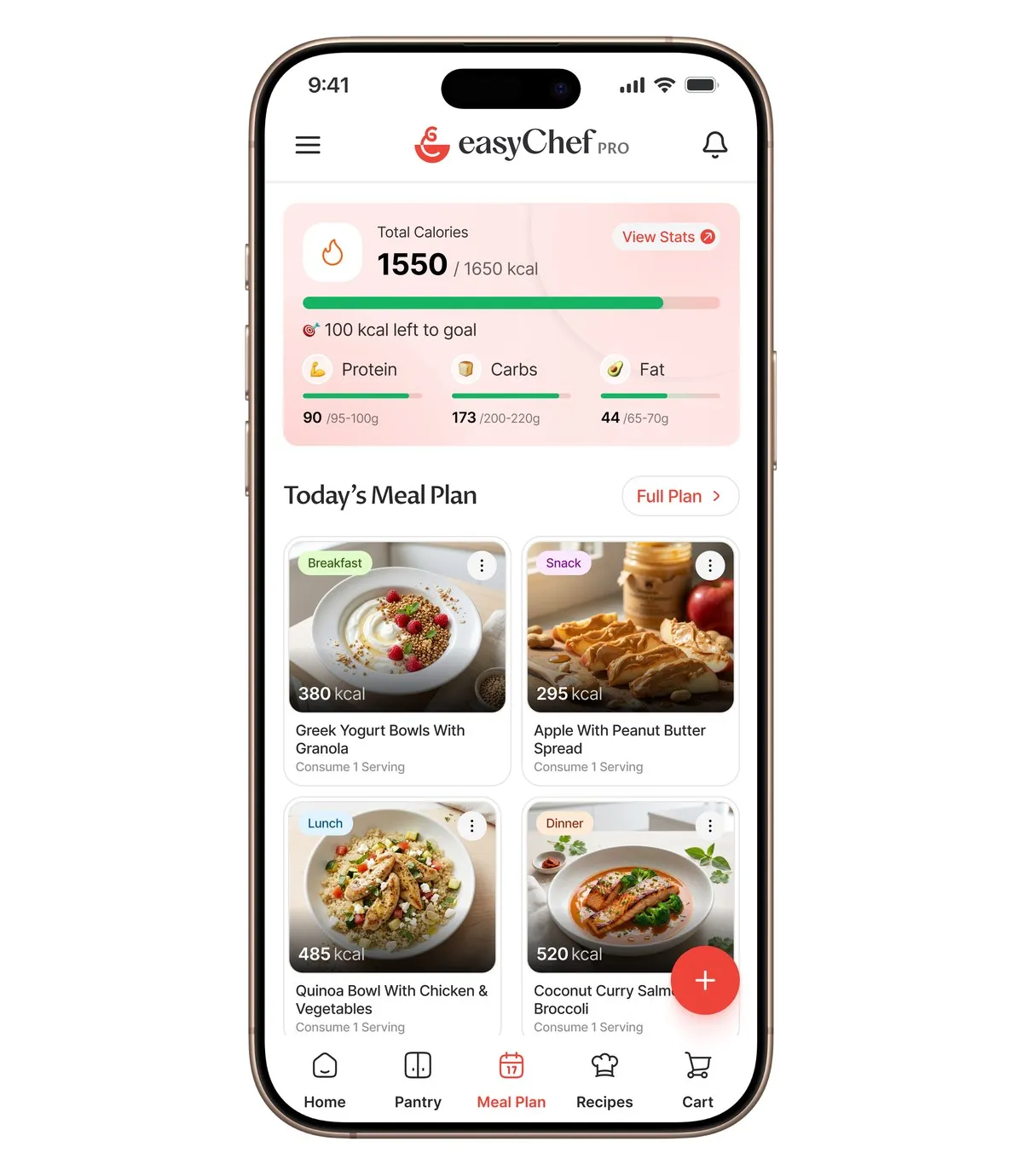
then builds your meal plan around your daily target.
Each day, you see exactly where you stand.
Change your goal, and your target updates with you.
Your TDEE, on your plate.
Get easyChef Pro and start putting your TDEE to work.
Short Answer
TDEE, your total daily energy expenditure, is your BMR plus the energy of everything you do, from walking to exercise. It's a great number to know, but on its own, it won't plan breakfast, lunch, or dinner.
Know what to cook, what to eat, and what to buy. easyChef Pro brings your recipes, nutrition, meal plans, pantry and shopping together in one app. It puts your TDEE and your macros front and center in your Health Summary, then builds your meal plan around your daily target. Each day, you see exactly where you stand.
What your TDEE is
TDEE starts from BMR, the energy your body uses at rest in a day, and multiplies it by an activity factor, a number for how active you are. The more you move in a typical day, the higher the factor and the higher your TDEE.
For how BMR and TDEE differ, with a worked example, see What Is the Difference Between BMR and TDEE? To work out your own number, try the TDEE calculator.
Where you see your TDEE in easyChef Pro
easyChef Pro puts your TDEE and your macros front and center in your Health Summary. It shows:
- Your body's baseline, your BMR, from the Mifflin-St Jeor equation.
- An avg. day for you, your TDEE, your BMR adjusted for your activity level.
- Daily Calorie Recommendations, your TDEE adjusted for your goal.
- How they are calculated, shown in the app with each number.
Your TDEE does not change with your goal. Your daily calorie recommendation does.
From your TDEE to a meal plan
easyChef Pro works out your BMR, TDEE and daily calorie recommendation from your answers, then builds your meal plan around your daily target.
- Auto Generate builds a meal plan from your goal, diet plan, health focus, allergies, protein sources and meals per day.
- Build It Yourself gives you the days to plan. From any recipe page, tap Add to Meal Plan and choose the day, meal and servings.
Read more in Meal Plan Generator: Automatic Plan or Build Your Own?
Each day, see where you stand
Mark meals eaten to see your calories against your target and the protein, fat and carbs for each meal, with a day streak and weekly reports you can export as a PDF.
Change your goal, and your target updates with you
When you change your activity or goal in Preferences, the app recalculates. Your meal plan and your calories against your target in My Progress use these numbers.
These numbers are estimates. easyChef Pro is not medical advice. If you have a health condition, talk to your doctor or a registered dietitian about your targets.
What makes easyChef Pro different
The problem was never you. The system was disconnected.
A calculator gives you a number and stops. In easyChef Pro your TDEE becomes a daily calorie target, a meal plan built around it, recipes with nutrition per serving and a record of calories against your target, all in one app.
Related Reading
Frequently Asked Questions
- What is TDEE?
- TDEE, your total daily energy expenditure, is your BMR multiplied by an activity factor, so it includes the energy of everything you do.
- Where do I see my TDEE in easyChef Pro?
- In your Health Summary, with your BMR and your daily calorie recommendation, and how each is calculated.
- Does my TDEE change when I change my goal?
- No. Your TDEE comes from your BMR and your activity. Your goal changes your daily calorie recommendation, and the target your meal plan is built around updates with you.
- How does easyChef Pro turn my TDEE into a meal plan?
- It works out your daily calorie recommendation from your answers and builds your meal plan around your daily target. Auto Generate builds a plan from your goal, diet plan, health focus, allergies, protein sources and meals per day, or you can build your own days.
- How is TDEE calculated?
- TDEE is your BMR multiplied by an activity factor. The easyChef Pro website calculators use factors from 1.2 for sedentary to 1.9 for very active.
ON YOUR PLATE
Start Putting Your TDEE to Work
easyChef Pro puts your TDEE in your Health Summary and builds your meal plan around your daily target.



On a computer? Scan with your phone camera to get the app.
Your TDEE, on your plate
See your TDEE in your Health Summary and a meal plan built around your daily target.