THE APP THAT EVOLVES WITH YOUR LIFE
The Meal Planning App Built Around Your Own Targets
Your plan starts with your profile and daily targets, not a template. In easyChef Pro's meal planning app, your targets and plan update as your profile or goal changes. Snap a photo or scan a barcode to add meals and products.

Your plan, not a template Built from your profile
Meals for your goal, with room to swap
Your plan is built from your profile and daily targets and updates when your profile or goal changes. Snap a photo or scan a barcode to add meals and products.
- You don't have to work out each meal: Auto Generate uses your goal, diet, health focus, allergies, protein sources and meals per day.
- Build It Yourself lets you plan your days and add any recipe to a day and meal with the servings you want.
- Add a product, including by barcode, or a meal by picture or search. Swap a planned meal for a ranked alternative.
- Mark meals eaten to see calories against target, protein, fat and carbs per meal, a day streak and weekly reports exportable as PDFs.
- Targets come from your sex, birthday, height, weight, activity and goal. Health Summary shows BMI, BMR, TDEE and daily calories.
- Diet plans include Balanced, Keto and Anabolic. Balanced Health Focus: Heart, Metabolic, Digestive, Inflammatory, Performance or General.
- Recipes tagged with your allergies are excluded from automatic plans; you can also hide recipes you don't want to see.
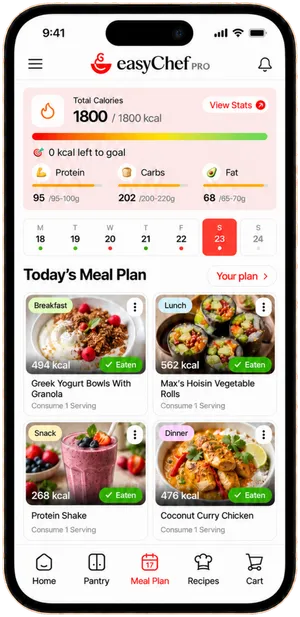
Change a recipe, keep the original
Your own recipes fit into a plan built for your targets: keep them together, save changes as copies, and add either version to a day.
- Change a recipe without losing it: swap, add or remove ingredients and compare the scores. Remix saves it as a copy.
- Save a link to your account with nutrition calculated. Recipes import from 580+ sites.
- Keep recipes in cookbooks you make, with no limit on recipes or cookbooks.
- Search recipes with a dish photo, or create your own in five steps with photos, ingredients, steps and timers.
- Publish recipes and cookbooks; browse community cookbooks, trending and featured recipes, and chef profiles.
- Rate recipes from 1 to 5 stars, leave reviews and see others' ratings.
- Share a recipe by link; on a phone with the app, it opens the recipe in the app.
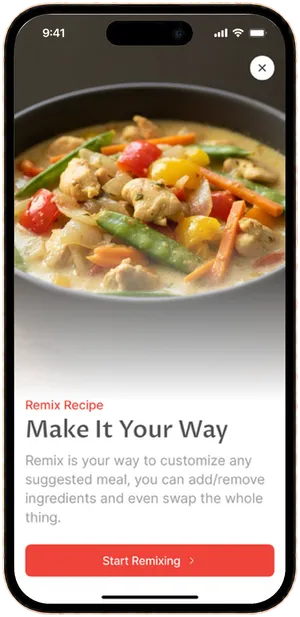
Know what's in your pantry before you shop
Know what you have before shopping for recipes in your plan, with pantry ingredient counts and a cart you can keep as your shopping list.
- Use food before it expires: track quantities and expiry dates, then find recipes for items expiring in the next 14 days.
- Scan a barcode to add a product to your pantry or cart.
- Snap a photo of your products and confirm the matches, search the catalog, or create your own product.
- Know how many ingredients for a recipe you already have in your pantry.
- Fill your cart with all of a recipe's products, or add products one at a time.
- Use your cart as a shopping list; share it as text or a link, or save it as a PDF.
- Send your cart to Walmart; products it doesn't carry appear as skipped.
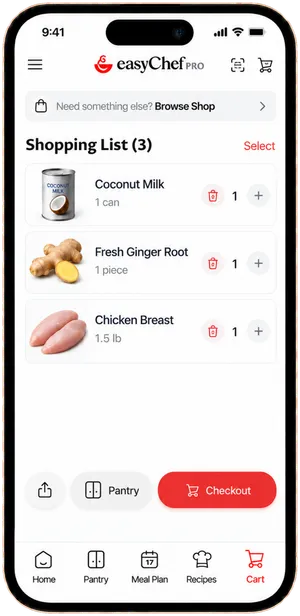
Keep your place with Cook Mode
Cook the meals in your plan step by step with Cook Mode, then preview and confirm what comes off your pantry.
- Follow along without losing your place: Cook Mode has timers on the steps that need them, and on longer timers, it can notify you when a timer ends.
- Keep your pantry up to date by previewing and confirming what comes off when you finish.
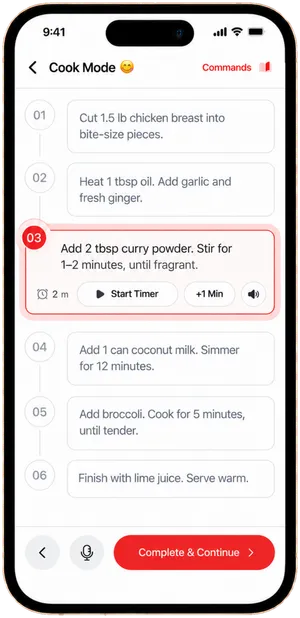
Know what you're eating before you cook
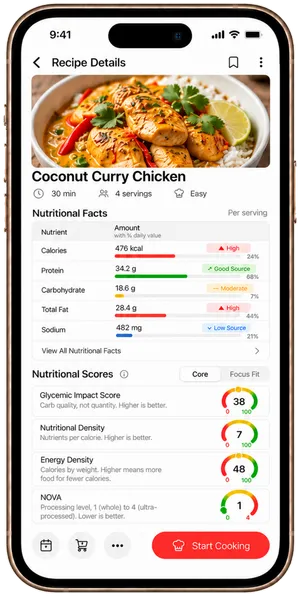
See how a recipe fits your day before you cook, with 20 nutrients per serving shown against your own daily targets in easyChef Pro.
- Before you cook, see 20 nutrients per serving, each with a rating and its share of your daily target.
- See a recipe's Glycemic Impact Score, Nutritional Density, Energy Density and NOVA level from 1 to 4.
- Scores from Focus Fit data: Metabolic, Heart Health, Digestive & Gut, Inflammation Control, Muscle & Performance, General Wellness.
Learn more about each feature
- Recipe Box App: How to Keep All Your Recipes in One Place
- Meal Plan Generator: Automatic Plan or Build Your Own?
- Food Expiration App: How to Track What Expires Soon
- Heart Healthy Recipes: See How Each Recipe Scores
- Keto Meal Plan: How to Plan a Keto Week in easyChef Pro
- Nutrient Density: What It Means and How to Read It
- Walmart Grocery List: Plan Meals, Then Send Your Cart
- Food Diary App: Log Meals From Your Plan in easyChef Pro
- Write Your Own Cookbook: A Digital Cookbook App Guide
- Shopping List App: How to Use One That Matches Your Week
- Cooking Timer App: Timers Built Into Your Recipe Steps
- Pantry Tracker: Know What You Have and What Expires Soon
- Recipe Reviews: How to Read Them Before You Cook
- Recipe Sharing App: Publish, Share and Find New Recipes
- Recipe to Grocery List: Add a Recipe's Products to Your Cart
- Create Your Own Recipe in 5 Steps, With Photos and Timers
- Recipe Remix: Change a Recipe and Compare Before and After
- Can I Change a Recipe Without Losing the Original?
- Healthy Meal Swaps: How to Swap a Meal in Your Plan
- Photo Food Log: Add a Meal to Your Plan From a Picture
- Share Recipes With Friends: Send a Recipe Link
- How to Add a Recipe to a Meal Plan: Date, Meal and Servings
- What Is the Difference Between BMR and TDEE? Explained
- Your TDEE in easyChef Pro: From Number to Meal Plan
Common questions about easyChef Pro
What does easyChef Pro do?
- Know what to cook with easyChef Pro, a meal planner app that builds your plan around your profile and daily targets. Change your profile or goal and your plan and targets update. You can save and remix recipes, check their nutrition and scores, track your pantry and send recipe products to your cart and on to Walmart. Snap a photo or scan a barcode to add meals and products. Cook step by step in Cook Mode. Get the app on the App Store or Google Play.
How does the meal planner work?
- easyChef Pro can build your meal plan for you, or you can build it yourself. Answer questions about your sex, birthday, height, weight, activity and goal to get calorie and macro targets. Auto Generate uses your goal, diet plan (Balanced, Keto or Anabolic), health focus, allergies, protein sources and meals per day. Recipes tagged with allergies you set are left out of automatic plans. Add any recipe to a day, swap a meal for a ranked alternative, and mark meals eaten to see calories against your target and macros for each meal.
Can I save, import and remix recipes?
- Yes, easyChef Pro lets you save, import and remix recipes. Paste a link to save a recipe to your account with its nutrition calculated, then keep it in a cookbook. You can swap, add or remove ingredients and apply your changes to compare scores and nutrition before and after. The remix is saved as its own recipe; the original stays as it was. You can create your own recipes too.
How are recipe nutrition and scores shown?
- Know what you're eating before you cook: each recipe shows 20 nutrients per serving, each with a rating and its share of your daily target. You'll also see a Glycemic Impact Score, Nutritional Density, Energy Density and a NOVA level from 1 to 4. Recipes with Focus Fit data show six health-focus scores: Heart Health, Metabolic, Digestive & Gut, Inflammation Control, Muscle & Performance and General Wellness.
How does the pantry work?
- See what you've got and find recipes for items nearing expiry with the easyChef Pro pantry. Add products by barcode, by photo or by searching the catalog. Set quantities and expiry dates, see what expires in the next 14 days, and pick items to see recipes that use them. Each recipe shows how many of its ingredients are in your pantry. After cooking, preview and confirm what comes off your pantry.
How do the cart and Walmart work?
- You can send your cart to Walmart, with items it doesn't carry listed as skipped. In easyChef Pro, add all products for a recipe after a quick confirmation or add single products; keep the cart as a shopping list, share it as text or a link, or save it as a PDF.
What is Cook Mode?
- Know what comes next as you cook: Cook Mode takes you through a recipe step by step, with timers on the steps that need them. On longer timers, the app can notify you when a timer ends, if you allow notifications. After cooking, preview and confirm what comes off your pantry.
Are the free tools on this website in the app?
- Yes, the site's free calculators are built into easyChef Pro's features. From your answers, the app works out your TDEE and BMR, plus calorie and macro targets, in your Health Summary. You'll see each recipe's nutrients against your daily target, along with its scores and NOVA level. Scan barcodes to add products to your pantry or cart, or snap a photo for your pantry. Try the calculators free on the web first, then get the app.
What does it cost?
- 7 days free, then $7.99/month. Renews automatically. Every feature in the app is included in the subscription and in the free trial.
Important health information
easyChef Pro is a nutrition and meal-planning tool, not a healthcare provider. It does not diagnose, treat, cure, or prevent any disease. Health scores, calorie and macro figures, meal plans, and expiry estimates are informational estimates rather than guarantees -- individual results vary. Always read product labels for allergens, and speak with your physician or a registered dietitian before making health decisions, especially if you have a medical condition, a food allergy, are pregnant, or have eating-disorder concerns.
Tonight's plan, built from your profile
Know what's for dinner: your plan is built on targets from your profile, and both update as your goal changes. Snap a photo or scan a barcode to add meals and products.



On a computer? Scan with your phone camera to get the app.
7 days free, then $7.99/month. Renews automatically.
Export weekly reports as a PDF, and request account deletion in the app.
Know what to expect before you download: try easyChef Pro's calculators free here: free recipe nutrition calculator check a product barcode work out your TDEE browse scored recipes