App Features
Recipe Box App: How to Keep All Your Recipes in One Place
Short Answer
A recipe box app is a digital cookbook on your phone: one place for the recipes you save from websites, the family recipes you write down yourself and the versions you change to suit you. Most people keep recipes in too many places, such as bookmarks, screenshots and cards, and when they find the one they want, they still do not know what is in it.
Know what to cook, what to eat, and what to buy. easyChef Pro brings your recipes, nutrition, meal plans, pantry and shopping together in one app. Save a recipe from a link, sort it into your own cookbooks, and change it with Remix while the original is kept. Each recipe shows its nutrition per serving. From a recipe, add it to your meal plan, see how many of its ingredients are already in your pantry, and add its products to your cart.
What a recipe box app is, and the problem it solves
Most of us keep recipes in too many places: bookmarks, screenshots, a notes app, a stack of cards, a cookbook with a torn page. When it is time to cook, the recipe you want is hard to find, and when you find it, you still do not know what is in it. Is it a light lunch or a heavy dinner? How much protein does it have? Could you swap the cream for something lighter?
A recipe box app fixes the first problem by putting the recipes you save in one place. easyChef Pro also fixes the second, because each recipe you keep shows its nutrition per serving and its scores.
How it works in easyChef Pro, step by step
1. Save a recipe from a link
Copy the link of a recipe page. In the app, open Recipes, tap Import Recipe and paste the link. easyChef Pro saves the recipe to your account and calculates its nutrition. It works with English-language recipe pages.
2. Sort it into a cookbook
Save any recipe to a cookbook, and make cookbooks for weeknights, baking, lunches or anything you like. Your Favorites cookbook is ready when you sign up, so there is always somewhere to put a recipe you like.
3. Write your own recipes
Family recipes and your own dishes belong in the box too. Create a recipe in five steps, with photos, ingredients, steps and timers, and it sits next to the recipes you saved.
4. Make a saved recipe your own
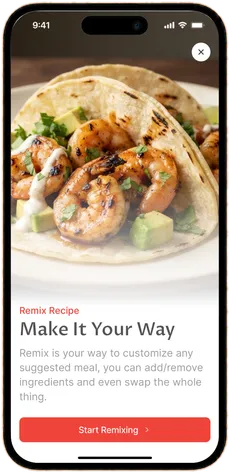
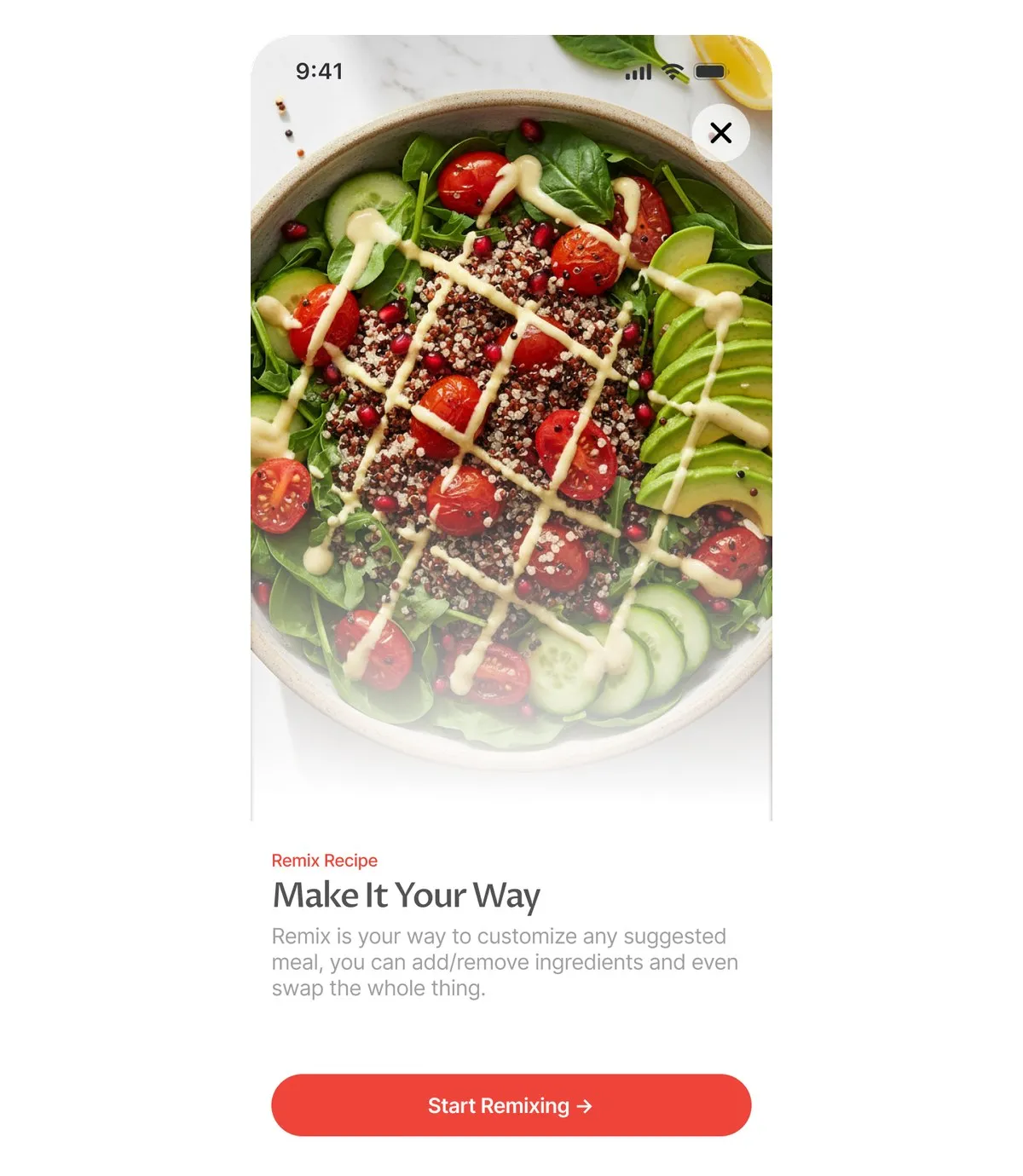
Open a recipe and tap Start Remixing. Swap, add or remove ingredients, then tap Apply Changes. The Nutrition Impact view compares the scores and nutrition before and after your change. Your remix is saved as its own recipe, so the original stays as it was.
5. Share it
Share a recipe by link. On a phone with the app, the link opens the recipe. You can also publish your recipes and cookbooks, and browse community cookbooks, trending and featured recipes, and chef profiles.
How to organize your recipe box so you use it
A recipe box only helps if you can find what you saved. A few habits keep it useful:
- Name cookbooks by when you cook, not just by what you cook. "Weeknight dinners", "Sunday baking" and "Lunches to take" are easier to open on a busy evening than "Chicken" or "Italian".
- Save the recipe, then make it yours. When you change a recipe, remix it rather than editing your memory of it. The original stays as it was, and your version is saved with its own nutrition.
- Keep your own recipes next to the saved ones. Write down the family dishes you cook from memory. Once they are in the app, they get the same nutrition per serving and scores as any recipe you import.
- Use Favorites as your shortlist. Keep the recipes you cook most in your Favorites cookbook, so the ones you rely on are one place away.
- Rate what you cook. Rate a recipe from 1 to 5 stars and leave a review, so you remember what worked the next time you plan.
How a recipe box with nutrition helps you eat well
Knowing what is in a recipe is the first step to choosing well, and easyChef Pro shows it for each recipe you keep:
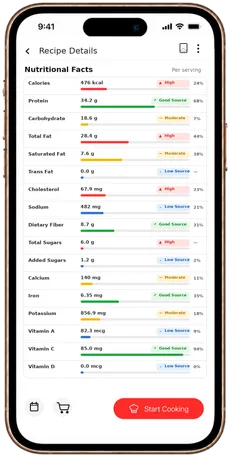
- Nutrition per serving. See 20 nutrients per serving, each with a rating and its share of your own daily target. A recipe is no longer just ingredients and steps. You can see how it fits your day.
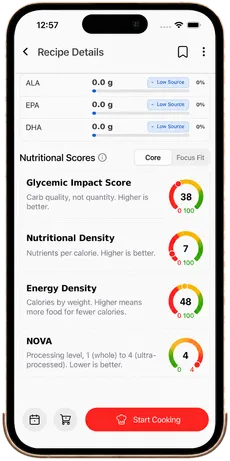
- Scores you can compare. Each recipe shows a Glycemic Impact Score, Nutritional Density, Energy Density and a NOVA level from 1 to 4, which rates how processed the ingredients are.
- Focus Fit. Recipes with Focus Fit data show six health-focus scores: Heart Health, Blood Sugar, Digestive & Gut, Inflammation Control, Muscle & Performance and General Wellness.
- Changes you can measure. When you remix a recipe, you see how the swap changes its scores and nutrition before you save it, so you choose your version with the numbers in front of you.
The scores describe the recipe. They are not medical advice.
What makes easyChef Pro different
The problem was never you. The system was disconnected.
Most recipe box apps stop at storage. easyChef Pro connects the recipes you keep to the rest of your kitchen:
- add any recipe to a day and meal in your meal plan;
- see how many of its ingredients are already in your pantry, like 4 of 6;
- add its products to your cart and send the cart to Walmart;
- cook it step by step in Cook Mode, with a timer for each step.
Your recipe box is not a separate app. It is part of how you plan, shop and cook.
Related Reading
Frequently Asked Questions
- What is the best recipe box app?
- The best recipe box app keeps your recipes in one place and tells you what is in them. easyChef Pro saves recipes from a link, sorts them into cookbooks, lets you remix them, and shows the nutrition per serving and the scores for each one.
- Is a digital cookbook app the same as a recipe box app?
- Yes, the names mean the same thing: an app that keeps your recipes in one place. In easyChef Pro, your recipes live in cookbooks you make, with a Favorites cookbook ready when you sign up.
- How do I save a recipe from a website?
- Copy the link of the recipe page, open Recipes in the app, tap Import Recipe and paste the link. easyChef Pro saves the recipe to your account with its nutrition calculated. It works with English-language recipe pages.
- Can I change a saved recipe without losing the original?
- Yes. Remix it by swapping, adding or removing ingredients. Your remix is saved as its own recipe, so the original stays as it was.
- Does the app show the nutrition of my saved recipes?
- Yes. Each recipe shows 20 nutrients per serving, each with a rating and its share of your daily target, plus its Glycemic Impact Score, Nutritional Density, Energy Density and NOVA level.
KEEP YOUR RECIPES
All Your Recipes in One Place
Save recipes from a link, sort them into cookbooks and remix them in easyChef Pro. See the nutrition per serving for each one.



On a computer? Scan with your phone camera to get the app.
Keep the recipes you love, and know what is in them
Save, sort and remix your recipes in easyChef Pro, with the nutrition per serving for each one.