App Features
What Should a Cooking Timer App Do That a Kitchen Timer Cannot?
Short Answer
A cooking timer app should put the timer on the step it belongs to, so you are not setting one timer for the pasta and trying to remember what the second one was for. A kitchen timer counts down, but it does not know the recipe. The hard part of cooking something new is keeping track of where you are and what is on the heat.
Know what to cook, what to eat, and what to buy. easyChef Pro brings your recipes, nutrition, meal plans, pantry and shopping together in one app. Cook Mode shows step by step recipes, one step at a time, with the amounts each step needs and a timer on the step itself. The app sends a notification when 30 seconds are left and when the timer ends, and when you finish, your pantry updates after you confirm.
What to look for in a cooking timer app
- The timer sits on the step. You know what each countdown is for.
- A warning before it ends. A heads-up gives you time to get to the stove.
- Room to adjust. Adding a minute should be quick, not a new timer.
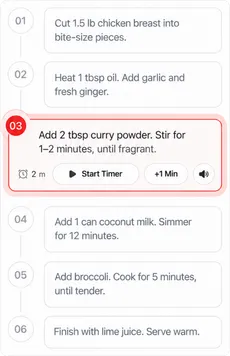
- You always know where you are. The current step stands out from the rest.
How Cook Mode works, step by step
- Open a recipe and start Cook Mode. Each ingredient is marked Available or Missing in your pantry. Start cooking, or choose Cook Anyway.
- Follow one step at a time. Each step shows the amounts it needs.
- Start the step's timer. Add a minute with +1 Min if it needs longer.
- Let the notification find you. The app sends one when 30 seconds are left and another when the timer ends. Allow notifications for easyChef Pro on your phone.
- Move on. Tap Complete & Continue for the next step.
- Finish. Preview what comes off your pantry, for half, one or two times the recipe or amounts you set, and confirm it.
Step by step recipes: why one step at a time helps
A recipe written as one paragraph asks you to hold the whole method in your head. Step by step recipes break it into actions you can finish and tick off. With one step on screen and its timer next to it, you can look away to chop or stir and find your place again at a glance.
Tips for cooking with step timers
- Read all the steps once before you start. You will see which steps overlap.
- Prep first. Chop and measure before the first timer, so a countdown never catches you with a knife in hand.
- Start the timer when the food goes on the heat, not when you read the step.
- Use the extra minute. Stoves differ. If the step says 5 minutes and it is not done, add a minute rather than guessing.
What makes easyChef Pro different
The problem was never you. The system was disconnected.
A timer app knows the time, and a recipe site knows the recipe. In easyChef Pro the recipe, its timers, your pantry and your meal plan are in one app: plan the recipe, add its products to your cart, cook it step by step, and let the pantry update when you finish.
Related Reading
Frequently Asked Questions
- What is a cooking timer app?
- A cooking timer app times the steps of a recipe on your phone. In easyChef Pro, Cook Mode puts a timer on each step of the recipe, so each countdown belongs to a step.
- Does easyChef Pro have a cooking timer?
- Yes. In Cook Mode each step has its own timer, and the app sends a notification when 30 seconds are left and when the timer ends.
- Can I add time to a step?
- Yes. Add a minute to the step timer if the food needs longer.
- What are step by step recipes?
- Recipes shown as one action at a time instead of one block of text. Cook Mode shows each step with the amounts it needs.
- What happens when I finish cooking?
- Preview what comes off your pantry and confirm it, so your pantry stays up to date.
COOK STEP BY STEP
Cook With a Timer on Each Step
Open a recipe in easyChef Pro, start Cook Mode, and follow it one step at a time with a timer on each step.



On a computer? Scan with your phone camera to get the app.