Cook mode, one step at a time
Cook the recipe you planned, one step at a time.


Try easyChef Pro FREE for 7 days, then just $7.99/month. Enjoy full Pro access. Cancel anytime.
Cook Mode Connects the Recipe, Your Pantry and Your Plan
Cook mode shows a recipe as step by step instructions, one step at a time, with a timer on the steps that need one. Most recipes are written as one long block of text, so you lose your place between the pan and the screen, and you guess how long something has been cooking.
Know what to cook, what to eat, and what to buy. easyChef Pro brings your recipes, nutrition, meal plans, pantry and shopping together in one app. Before you start, Cook Mode marks each ingredient as Available or Missing in your pantry. Each step shows its amounts and its own timer, and the app sends a notification when 30 seconds are left and when the timer ends. When you finish, preview what comes off your pantry and confirm it.
Check your pantry before you start
- Start Cook Mode from a recipe and see each ingredient marked Available or Missing in your pantry.
- Then start cooking, or choose Cook Anyway.
Follow the recipe one step at a time
- Each step shows the amounts it needs, so you do not scroll back to the ingredient list.
- Tap Complete & Continue to move to the next step.
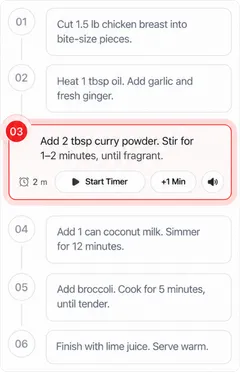
A timer on each step
- Start the timer on the step you are cooking, and add a minute if it needs longer.
- Get a notification when 30 seconds are left and when the timer ends.
Your pantry updates when you finish
- When you finish, preview what comes off your pantry, for half, one or two times the recipe or amounts you set, and confirm it.
Plan it, shop for it, cook it
- Add a recipe to your meal plan from its page, add its products to your cart, then cook it in Cook Mode.
More from easyChef Pro
Frequently asked questions
What is cook mode?
Cook Mode in easyChef Pro shows a recipe one step at a time, with the amounts each step needs and a timer on each step.
Does Cook Mode have timers?
Yes. Each step has its own timer. You can add a minute, and the app sends a notification when 30 seconds are left and when the timer ends.
Does Cook Mode check my pantry?
Before you start, it marks each ingredient as Available or Missing in your pantry. Then you can start cooking, or cook anyway.
Does my pantry update after I cook?
Yes. When you finish a recipe, preview what comes off your pantry and confirm it.
Try easyChef Pro FREE for 7 days, then just $7.99/month. Enjoy full Pro access. Cancel anytime.